I’m not sure why golem.de published an article on Seam Carving GUI (open source) today (maybe they have a selection of emergency posts for slow news days 😉 ), but I’m glad they did because I had no idea something like this even existed.
If you have no idea of what I’m talking about, take a look this video:
Ever been in a situation where you had a picture with exactly the content (“message, meaning, …”) you wanted, but not with the right dimensions? Seam carving could have saved the day.
I used it for a stock photo today which just had to be 550×225 pixels to fit in a template (sorry, can’t post the picture because I’d have to pay for the rights again – I’ll post a link when it goes online). It worked extremely well because the important objects did not stretch along the entire length of the picture. The sky and mountains in the background were resized in a way which made it look as if the photographer had used a wide-angle lens.
Encouraged by my success, I decided to try something extremely challenging. Here’s a photo of me on the balcony of a hotel (it just looks as if I was trying to log into unprotected wireless networks – actually I was enjoying the sunshine and fresh air):

The picture above is 480 x 360 pixels. Let’s say I want to keep the width, but reduce the height to just 220px. Usually, this would mean cropping:
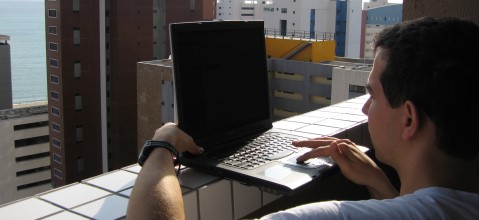
Notice that the top of the other buildings and the horizon is no longer visible.
With seam carving, you can keep all of this in the picture (also, it now looks as if I had a widescreen laptop):
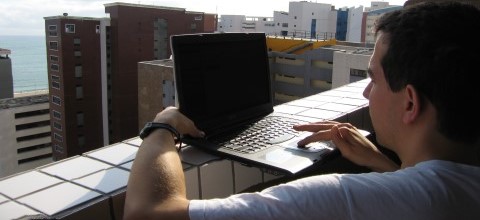
As mentioned, this is an extremely challenging picture. Regular shapes are all over the place and if you look closely, you’ll find at least one odd area which would be noticeable even if you’d never seen the original picture (windows on the red building). Still, considering the difficulty, the software does an excellent job. You could fix the most noticeable problems in a minute in an image editor:
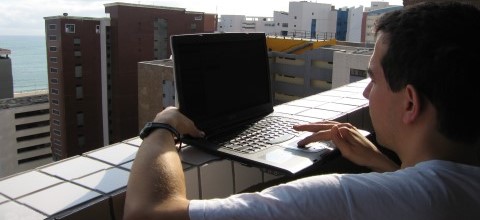
Pretty neat. I’m really looking forward to seeing what else will be possible with a few mouse clicks in the near future.
Here’s some additional info I scraped from the comments at golem.de:
- If you’re using gimp, here’s a plugin for you.
- Photoshop CS4 can do it, too (it’s called content-aware scaling)
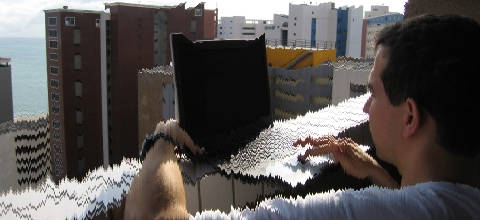
- For fancy online retargeting (how many names are they gonna give this?), check out rsizr. While I liked the animation, the result wasn’t that convincing (I guess it’s art):
If you still haven’t done so, go get Seam Carving GUI and have fun (did I mention it’s free and available for Windows, Mac OS and Linux?).